Hidden GB WhatsApp Features You Didn’t Know in 2026
Introduction
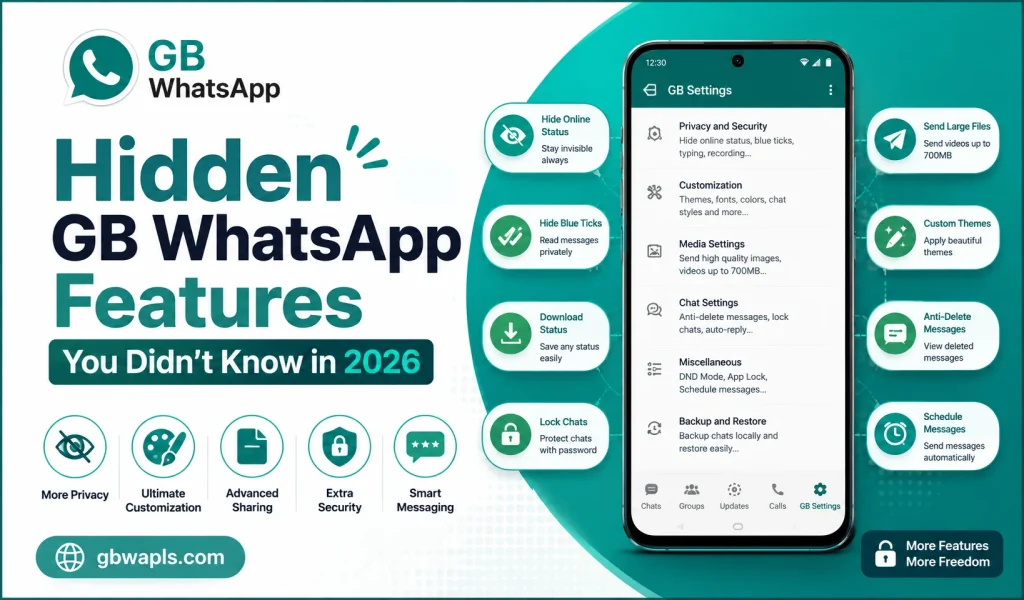
GB WhatsApp is full of hidden features that even experienced users have not discovered. In 2026, the mod has evolved into a powerhouse of customization, privacy, and productivity tools. While most users know the basics like themes and blue tick hiding, there are many lesser-known features that can completely change how you use WhatsApp.
This guide reveals 15 hidden GB WhatsApp features you probably did not know existed, with step-by-step instructions to enable each one.
Feature 1: Message Scheduler
GB WhatsApp allows you to schedule messages to be sent automatically at a future time. Open a chat, type your message, long press the send button, select Schedule Message, pick the date and time, and tap Schedule. The message will send automatically even if you are not online.
Feature 2: Auto-Reply
Auto-reply is perfect for business users and busy professionals. Open GB Settings, go to Business Tools, enable Auto-Reply, create custom replies for specific contacts or keywords, and set active hours for automatic responses. You can also disable auto-reply during non-working hours.
Feature 3: DND Mode
DND Mode disables internet only for GB WhatsApp, so you can use other apps normally. Open GB Settings, tap DND Mode, toggle it on, and use other apps without WhatsApp notifications. When you want to use WhatsApp again, toggle DND Mode off.
Feature 4: Status Downloader
Download any contact’s status update with a single tap. Open the Status tab, view any status, tap the download icon, and the status saves to your gallery automatically. No need to ask the contact to send the file separately.
Feature 5: Anti-Revoke Messages
Read messages deleted by the sender. Open GB Settings, go to Privacy and Security, enable Anti-Revoke Messages, and restart GB WhatsApp. Deleted messages will remain visible in your chat even after the sender recalls them.
Feature 6: Custom Tick Styles
Change the appearance of message ticks. Open GB Settings, go to Universal Settings, tap Tick Styles, choose from multiple designs like iOS-style, WhatsApp original, or custom shapes, and save changes.
Feature 7: Chat Bubble Customization
Change chat bubble shapes and colors for a personalized look. Open GB Settings, go to Universal Settings, select Chat Bubble, pick style, color, and size, and apply changes. The new design shows on both sent and received messages.
Feature 8: Conversation Screen Recording
Record your chat screen for tutorials or evidence. Open any chat, tap the three-dot menu, select Record Screen, choose audio source and quality, and start recording. Recordings save to your gallery in MP4 format.
Feature 9: Bulk Message Sender
Send the same message to multiple contacts without creating a group. Open GB Settings, go to Business Tools, select Bulk Message Sender, add contacts from your list, type your message, and tap Send. The message delivers to all selected contacts individually.
Feature 10: In-App Translator
Translate incoming messages without leaving the chat. Open any chat, tap the message you want to translate, select Translate, choose the target language, and the translation appears below the message instantly. This is perfect for multilingual conversations.
Feature 11: Group Description Visibility
View group descriptions without joining the group. Open the Groups tab, tap the search icon, type the group name or invite link, and view public group description before joining. This saves time when you are deciding which groups to join.
Feature 12: Floating Widget Mode
Keep a chat floating on top of other apps. Open any chat, tap the three-dot menu, select Floating Widget, and the chat appears as a small floating bubble. Drag it anywhere on screen and tap to expand and reply without leaving your current app.
Feature 13: Always Online for Selected Contacts
Stay online for specific contacts even when you are away. Open GB Settings, go to Privacy and Security, select Always Online for, add contacts from the list, and save your changes. Other contacts will see you as offline.
Feature 14: Media Sharing Boost
Increase the file size limit for media sharing. Open GB Settings, go to Media Sharing Settings, enable High Quality Image Sharing, set video sharing limit up to 700 MB, and adjust audio and document size limits as needed.
Feature 15: Custom Notification per Chat
Set unique notification tones and vibrations for individual chats. Open any chat, tap the contact name, select Custom Notifications, choose a tone from your library, set vibration pattern, and save your preferences. You can recognize who is messaging without looking at the screen.
Quick Comparison Table
| Feature | Where to Find It | Best Use Case |
|---|---|---|
| Message Scheduler | Long press send button | Planned greetings |
| Auto-Reply | Business Tools | Customer support |
| DND Mode | GB Settings | Focused work |
| Status Downloader | Status tab | Save memories |
| Anti-Revoke | Privacy and Security | Recover info |
| Tick Styles | Universal Settings | Personalization |
| Chat Bubbles | Universal Settings | Visual appeal |
| Screen Recording | Chat menu | Tutorials |
| Bulk Sender | Business Tools | Marketing |
| Translator | Chat message menu | Multilingual chats |
| Group Description | Group search | Preview groups |
| Floating Widget | Chat menu | Multitasking |
| Always Online | Privacy and Security | Stay available |
| Media Boost | Media Sharing Settings | Large file sharing |
| Custom Notifications | Chat info | Quick recognition |
Tips to Make the Most of Hidden Features
To make the most of hidden GB WhatsApp features:
Safety Considerations
Some features carry extra responsibility:
What to Avoid
There are a few things to avoid when using these features:
Future of GB WhatsApp Features
In 2026 and beyond, GB WhatsApp is expected to add AI-powered reply suggestions, built-in VPN for secure chats, voice changer for calls, cloud backup integration, cross-platform sync with iOS, and advanced group analytics. The mod continues to evolve rapidly and users can look forward to many more powerful tools.
Frequently Asked Questions
Final Verdict
These 15 hidden GB WhatsApp features open a new world of customization, privacy, and productivity in 2026. Take time to explore each one, enable the ones that match your style, and enjoy a smarter messaging experience.